How to Create a Backup (Export)
A backup is a file containing a copy of the database structure and data. In HeidiSQL, you can create a backup by exporting the database to a .sql file.
Make sure you have connected to the database first.
1. Start the Export
- In the left panel, right-click on the database you want to back up.
- Select Export database as SQL.
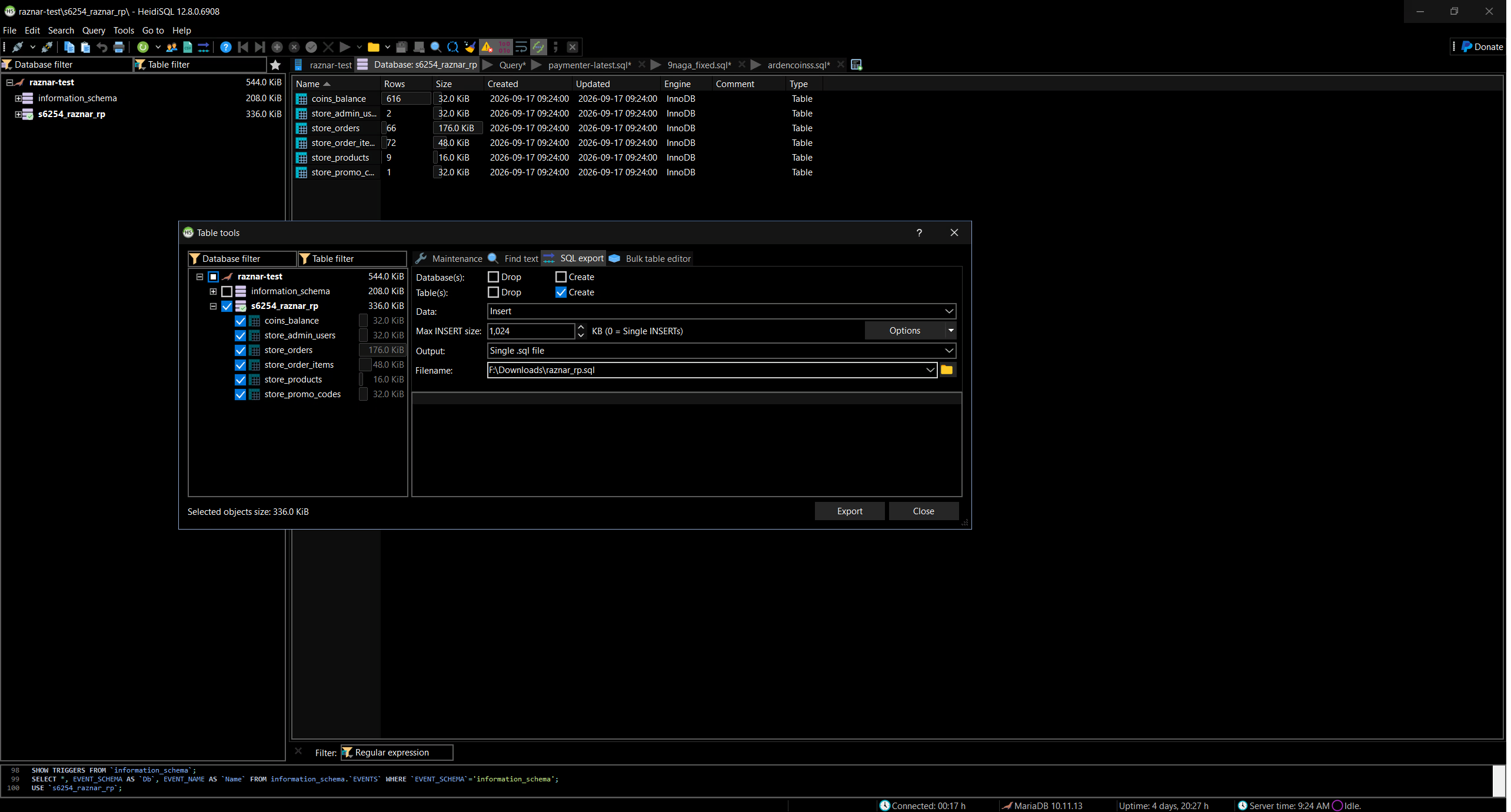
2. Configure the Export Options
Configure the following options in the export window:
- Database → make sure the selected database is correct.
- Output → select File, then choose the storage location.
- Tables → select All if you want to back up all tables.
- Add DROP TABLE / DROP DATABASE → check it (optional). Useful so that old data is overwritten when this file is used to restore.
Click Export to begin.
3. Save the Backup File
The .sql file will be saved on your computer. Store this file in a safe place, and give it a clear name, for example:
backup-toko-2026-09-16.sql
tip
For large databases, consider saving backups regularly (for example via the Schedule feature in the panel).
Next Steps
- How to Import / Restore a Backup — using a
.sqlfile on another database or bringing a database back from a backup. - How to Delete a Database